Website monitoring
Website uptime monitoring that confirms before it alerts
Website monitoring is the practice of requesting your pages at a fixed interval from outside your network and alerting someone when they fail. MoniterMySite checks any URL from up to five regions, requires more than one region to agree before opening an incident, and notifies your team where they already work.
- Checks as fast as every 10 seconds on the Summit plan, and every 5 minutes on the free Starter plan
- Five regions on four continents, with a configurable fail threshold and multi-region confirmation
- Alerts to email, Slack, Discord, Microsoft Teams, Google Chat, Telegram, PagerDuty and signed webhooks
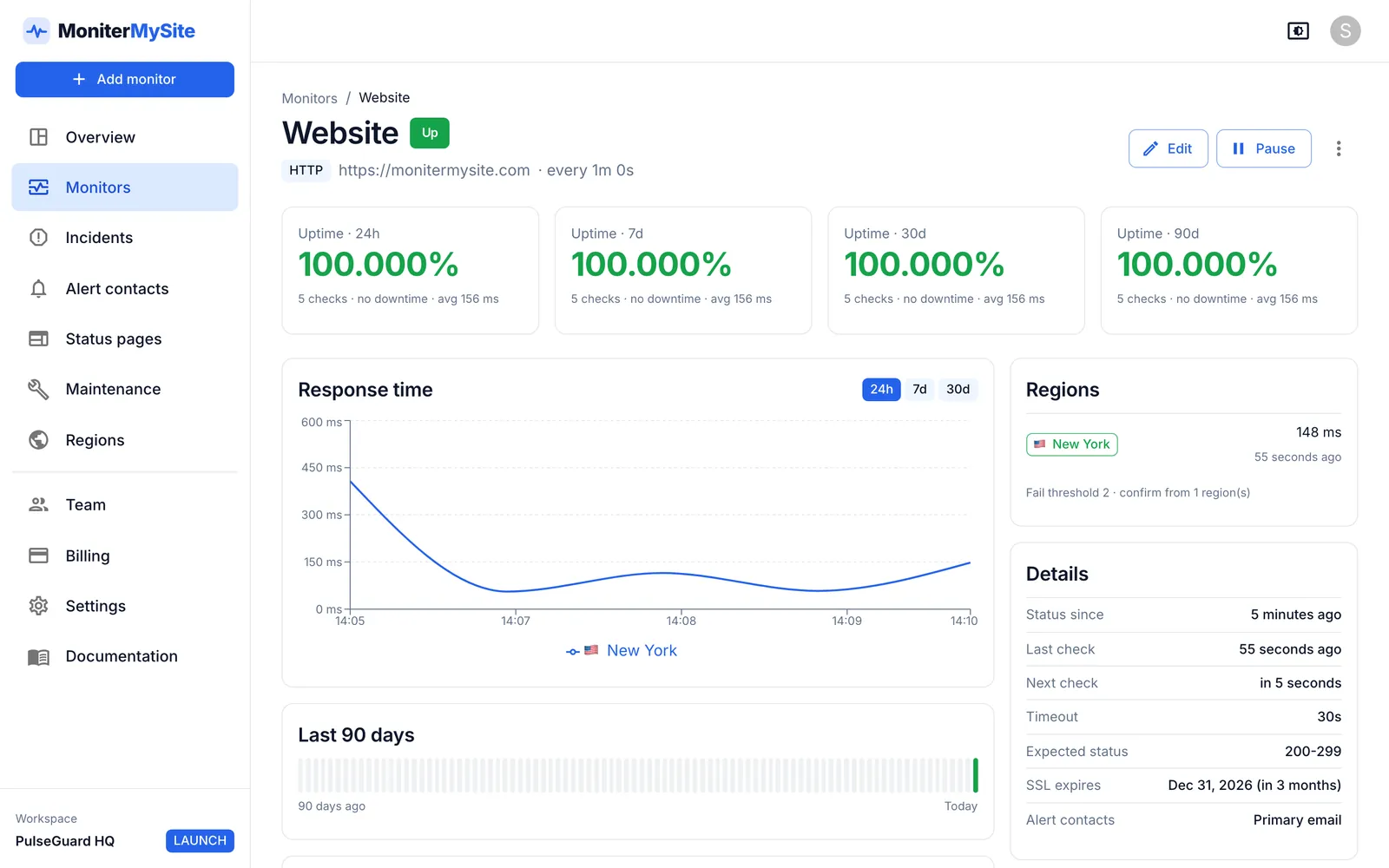
How it works
Add the URL
Choose HTTP(S), paste the address, pick how often to check and which regions to check from. Run a test check to see the status code and response time before you save.
We check from outside your network
Checks run from our own probes in New York, San Francisco, Frankfurt, Singapore and Sydney, rotating between your selected regions. Each result records the region, status code and response time.
Regions confirm the outage
A region is only treated as down after the number of consecutive failures you set (the default is 2), and an incident opens only when as many regions as you require agree.
You are alerted, then told when it is fixed
Contacts receive the down alert with the error and the regions that saw it. While the site is down we re-check every minute, and recovery is declared only when every region is healthy again.
What you get
Expected status codes
Any 2xx response is healthy by default. Use ranges and lists such as 200-299,301 or 401 when a page is supposed to answer with something else.
Slow-response alerts
Set a response-time threshold and be told when the site is up but slower than it should be. You get one alert when the threshold is first crossed, not one for every slow check.
SSL validation and expiry
HTTP monitors validate the certificate and track its expiry, with reminders at 30, 14, 7, 3 and 1 day before it runs out, plus a threshold of your own.
Redirects, headers and auth
Follow redirects or stop at the first response, add custom headers, and authenticate with basic or bearer credentials.
Maintenance windows
One-off, daily, weekly or monthly windows keep checks running but mute alerts and exclude the downtime from your uptime figures.
History you can look back on
Every check is kept per region: 30 days on Starter, up to 24 months on Summit, with uptime and response-time charts on each monitor.
Why external website monitoring matters
A website can be broken in ways your own servers never notice: DNS points at the wrong address, a certificate has expired, a CDN edge is failing on one continent, or a deploy returns 500 to visitors and 200 to the health endpoint. The only way to know what a visitor sees is to be a visitor: request the page from the outside, on a schedule, from more than one place.
The other half of the problem is noise. A monitor that pages you every time a single probe has a bad second trains your team to ignore it. MoniterMySite checks from several continents, requires consecutive failures before a region counts, and lets you choose how many regions must agree before anyone is woken. The incident records the region timeline so you can see where the outage was visible.
What you can configure on a website monitor
An HTTP(S) monitor covers landing pages, web apps and health endpoints alike. The options are the ones power users expect:
- Check interval from 10 seconds to 1 hour, depending on plan
- Timeout from 1 to 60 seconds
- Regions: any combination of the five live locations, within your plan's allowance
- Fail threshold of 1 to 10 consecutive failures per region, and the number of regions that must confirm
- Expected status codes, custom method, headers and body, basic or bearer auth, redirect following and SSL validation
- A response-time threshold for slow-response alerts
Alerting and status pages
Alert contacts are shared across your workspace and attached per monitor. Email and webhooks are available on every plan; Slack, Discord, Microsoft Teams, Google Chat and Telegram from Launch; PagerDuty from Growth, where a down alert opens a PagerDuty incident and recovery resolves it automatically. Webhooks are signed with HMAC-SHA256 and retried three times.
A status page lets customers see for themselves. Group monitors into components, show 7, 30 or 90-day uptime bars and response times, post incident updates from Investigating through Resolved, and let visitors subscribe by email. Launch and above can serve the page on your own domain via a CNAME record; Growth and above can password-protect it.
Plans and limits
Every plan includes unlimited team members; first paid subscriptions carry a 14-day money-back guarantee. Prices are in US dollars.
| Plan | Price per month | Monitors | Fastest check | Regions per monitor |
|---|---|---|---|---|
| Starter | Free | 10 | 5 minutes | 1 |
| Launch | $9 ($7.50 yearly) | 100 | 60 seconds | Up to 3 |
| Growth | $29 ($24 yearly) | 200 | 30 seconds | All 5 |
| Summit | $79 ($65 yearly) | 1,000 | 10 seconds | All 5 |
Frequently asked questions
How often does MoniterMySite check my website?
As often as you choose, from every 10 seconds to every hour. The fastest interval depends on your plan: Starter every 5 minutes, Launch every 60 seconds, Growth every 30 seconds and Summit every 10 seconds.
Will I get false alerts when one monitoring location has a problem?
Not if you use confirmation. Each region must fail your threshold of consecutive checks before it counts as down, and you choose how many regions must agree before an incident opens. With three regions and confirmation set to 2, a single location losing connectivity never alerts anyone.
Can I monitor a website for free?
Yes. The Starter plan is free and includes 10 monitors checked every 5 minutes from one region, one public status page, email and webhook alerts, 20 alert e-mails per day, 30 days of history and unlimited team members.
What counts as the website being down?
A check fails when the response does not match your expected status codes, when the connection fails or times out, or when SSL validation fails. A region is down after your fail threshold of consecutive failures, and the monitor is down when the required number of regions agree.
Do I need to install anything on my server?
No. Every check runs from our own infrastructure. If your firewall or WAF blocks unknown clients, allow the published IP address of each region, listed on the allowlisting page in the docs.
Keep reading
Start monitoring in 30 seconds.
Nothing to install. No credit card. 10 monitors free, forever.