Status pages
A hosted status page your customers can trust
A status page is a public web page that shows customers whether your services are up, how reliable they have been and what you are doing about any incident. MoniterMySite hosts yours, fills it automatically from your monitors, and lets you post incident updates and scheduled maintenance, with email subscribers and a custom domain.
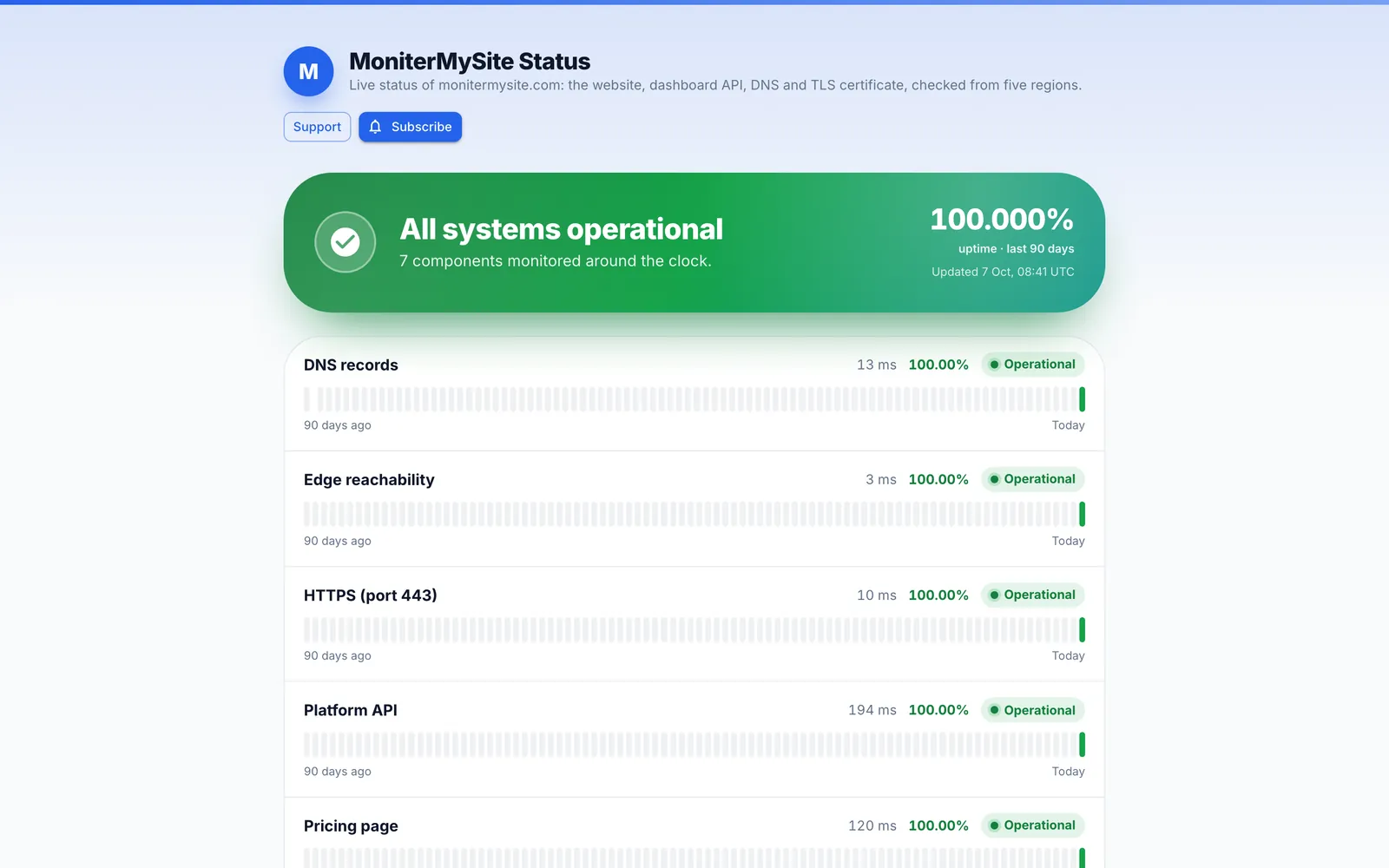
- Components with customer-friendly names, grouped into sections, with 7, 30 or 90-day uptime bars, uptime percentage and response-time sparklines
- Incident timelines (Investigating → Identified → Monitoring → Resolved) and scheduled maintenance, emailed to double-opt-in subscribers
- Your logo, brand colour and theme at monitermysite.com/status/your-page, or at status.yourcompany.com via a CNAME record
How it works
Create the page
Status pages → Create status page. Give it a name, a short description, your logo, brand colour, a support link and a light, dark or system theme. The URL slug becomes monitermysite.com/status/your-page.
Add components
Pick monitors and give each a customer-friendly name such as “Website” or “API”. Group them into sections such as Customer facing and Infrastructure, and order them as you like. There is no limit on components.
Choose what to show
Turn on uptime bars for 7, 30 or 90 days, the uptime percentage, response times and incident reasons. Decide whether visitors can subscribe, whether search engines should index the page and, on Growth and above, whether a password is required.
Publish and connect your domain
The page is live immediately on our domain. On Launch and above, enter your own hostname, add a CNAME record at your DNS provider and the page is served there with HTTPS once DNS propagates.
What you get
Filled from your monitors
Component status comes straight from the monitors behind it, and incidents opened by monitors appear in the history automatically. You only post when you have something to say.
Incident announcements
Post an incident with an impact level (none, minor, major or critical) and move it through Investigating, Identified, Monitoring and Resolved. Every update is timestamped on the page and emailed to subscribers.
Scheduled maintenance
Create a maintenance announcement with a start and end time. It appears on the page ahead of time, moves to In progress automatically and is marked Completed when it ends.
Email subscribers
Visitors subscribe with their email address and confirm with one click. They then receive every announcement and update, and every email carries an unsubscribe link.
Custom domain with HTTPS
Serve the page at a subdomain such as status.yourcompany.com by pointing a CNAME at MoniterMySite. HTTPS is handled for you. Available on Launch and above.
Privacy controls
Hide the page from search engines with a noindex tag on any plan, and require a password before the page is shown on Growth and Summit.
What belongs on a status page
A useful status page answers three questions in the first few seconds: is everything working, what is affected if not, and when was it last updated. Components give customers the vocabulary they expect, so “Checkout” and “API” rather than internal monitor names, and groups let a larger platform show a dozen components without becoming a wall of green bars.
History matters as much as the current state. The 7, 30 or 90-day uptime bars and the uptime percentage show prospective customers how reliable you have been, and the response-time sparklines show that the service is not only up but fast. The incident timeline, with each update timestamped, shows how you communicate under pressure, which is often what a buyer is really evaluating.
Finally, a status page should take work off your support queue. Email subscriptions mean customers hear from you before they open a ticket, and a support link on the page sends the ones who still need help to the right place.
Setting up a custom domain
Open the status page, choose Edit and enter the hostname you want, for example status.example.com. At your DNS provider create a CNAME record for that name pointing to monitermysite.com. DNS changes usually propagate within minutes but can take up to 24 hours; once they have, the page is served at your domain with HTTPS.
Use a subdomain such as status., not your bare domain, because most DNS providers cannot carry a CNAME record at the apex. If the page shows an error on your domain, verify the CNAME points exactly at monitermysite.com and that no proxy in front of it rewrites the Host header.
Plans and limits
Every plan includes at least one status page with unlimited components, uptime bars, announcements and subscribers. Custom domains start on Launch; password protection starts on Growth.
| Plan | Price per month | Status pages | Custom domain | Password protection | Hide from search engines |
|---|---|---|---|---|---|
| Starter | Free | 1 | No | No | Yes |
| Launch | $9 ($7.50 billed yearly) | 3 | Yes | No | Yes |
| Growth | $29 ($24 billed yearly) | 20 | Yes | Yes | Yes |
| Summit | $79 ($65 billed yearly) | Unlimited | Yes | Yes | Yes |
Frequently asked questions
What is a hosted status page?
A hosted status page is a status page served by your monitoring provider rather than from your own infrastructure, so it stays online when your systems do not. MoniterMySite serves yours at monitermysite.com/status/your-page or on your own subdomain, and keeps component status in sync with your monitors.
Can I use my own domain for the status page?
Yes, on Launch and above. Enter the hostname on the status page, add a CNAME record pointing to monitermysite.com at your DNS provider, and the page is served on your domain with HTTPS once DNS propagates.
How do subscribers get notified?
Visitors enter their email address on the page and confirm with one click (double opt-in). From then on they receive every announcement and every update you post, and each email includes an unsubscribe link.
Is the status page updated automatically when a monitor goes down?
Yes. Component status reflects the monitors behind it, and incidents opened by monitors appear in the page's history automatically. Posting an announcement is optional and is for the updates you want to write in your own words.
Can I keep the status page private?
You can hide it from search engines on any plan, and on Growth and Summit you can require a password before the page is shown. Custom domains, subscribers and announcements all work on password-protected pages.
How many status pages do I get?
Starter includes 1, Launch 3, Growth 20 and Summit has no limit. Every page can hold any number of components.
Keep reading
Start monitoring in 30 seconds.
Nothing to install. No credit card. 10 monitors free, forever.